 Skip to content


 Service
 Merch store
Film production
Livestream Production: Planning the Uplink, the Platform and the Backup
Oct
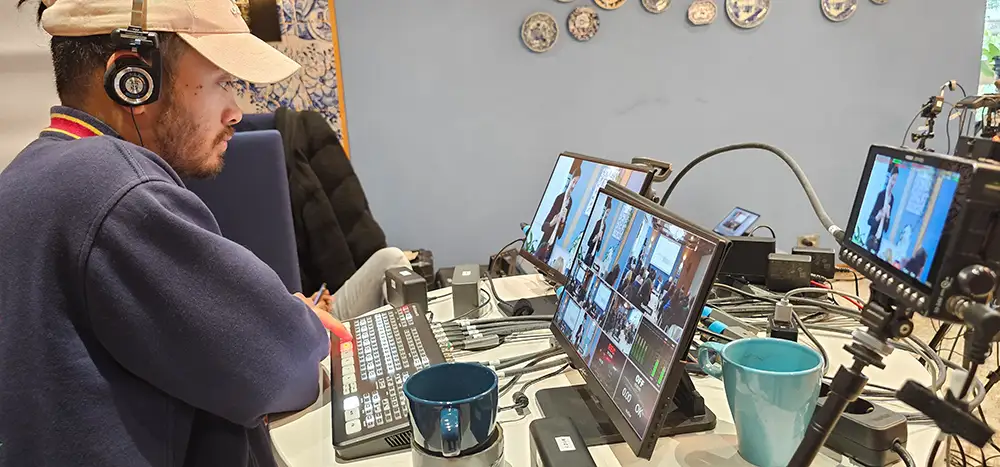
The kit is in place, the stage is built, the board has confirmed — and ten minutes before the start the broadcast drops, because the guest Wi-Fi cannot carry the upload. In a livestream production, the quality of the broadcast is not decided on the day but two to three weeks earlier: with the uplink, the platform and the plan for what happens when something fails.
This article works through the decisions in the order they come due — and names which of them sit with the company and which with the production team.
In short
- The uplink is the bottleneck. A dedicated, wired upload with guaranteed bandwidth, not the guest Wi-Fi.
- Three packages: 4 hours (€899), 8 hours (€1,699), 2 × 8 hours (€3,299) — net, each plus 19 % VAT. Every additional hour €249 net.
- Included: film team and equipment, sound with lavalier microphone, boom and recorder, lighting, the live broadcast in 1080p at 50 frames per second, hybrid conferencing with Zoom integration, teleprompter, plus 4K editing and effects.
- A parallel 4K recording runs alongside — the stream is not the only version.
- Fix the platform early: public, closed and hybrid are three different productions.
- Settle two legal questions in advance: music in the stream needs a licence, people on camera need consent.
- Delivery of the recording or a highlight film: usually 5–10 working days after the event.
First Question: Live, Recorded — or Both?
They are not the same thing, and the service page separates them cleanly:
| Livestream | Event film |
|---|---|
| real-time broadcast | recorded afterwards |
| interaction with the audience | focus on highlights |
| live vision mixing | post-production |
| hybrid attendance and remote guests | the physical event |
In practice: a stream costs more preparation and less post-production; an event film the other way round. If your audience is meant to experience the event at the same time — because something is being voted on, asked or decided — you need the stream. If it is about external presentation, the film is enough.
The most common case is the combination: broadcast live and record in 4K in parallel, then cut a summary. The service page names that explicitly as the standard route; planning the shoot itself is covered in Corporate Event Film Planning.
Two pricing routes that should not be confused:
- Stream as its own production: packages from €899 net according to the livestream service page.
- Stream as an add-on to an event film: “optional from €350” according to the event film service page.
Which route applies to you depends on what the main deliverable is. Ask about it specifically in your enquiry rather than calculating from either figure.
The Uplink Decides Everything Else
This is where streams fail, and the one point the production team cannot solve alone. You need three pieces of information from the venue, in writing:
- Guaranteed upload bandwidth, not the “up to” figure from the tariff.
- A wired connection at the control position. Wi-Fi is not a basis for the sending direction — it shares the air with every guest device in the room.
- Who in the building unlocks access, and whether firewall rules or a proxy are in the way.
How much bandwidth you need depends on resolution and frame rate. YouTube publishes concrete figures: for 1080p at 60 frames per second with H.264 the help article gives a minimum bitrate of 6 Mbps and a recommended setting of 17 Mbps; with the newer AV1 or H.265 codecs it is 4 and 12 Mbps respectively (YouTube Help: choose live encoder settings, bitrates and resolutions, retrieved 27 October 2026).
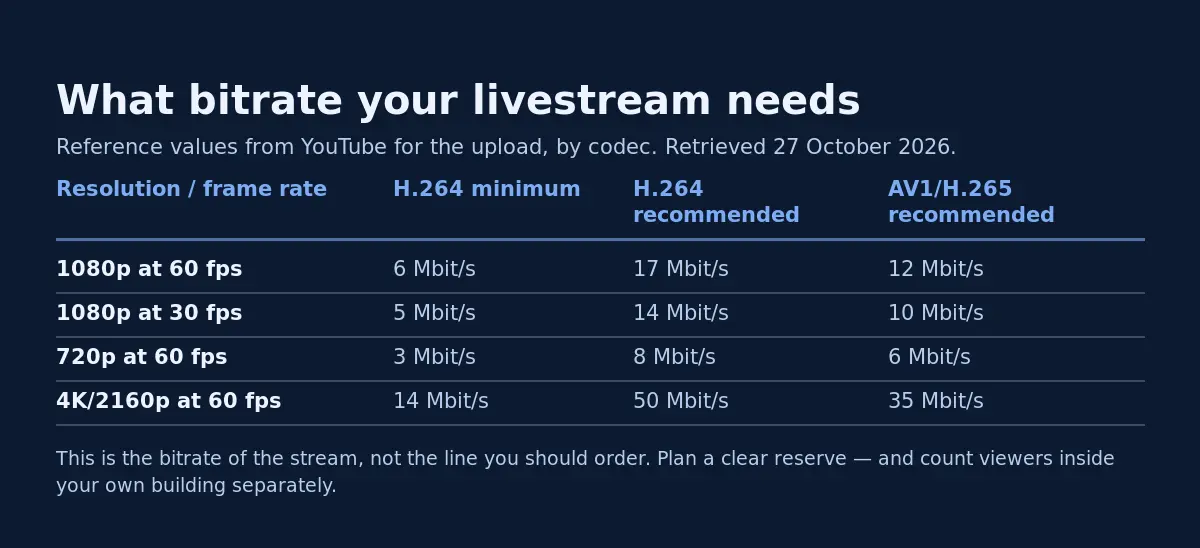
That is the bitrate of the stream — not the bandwidth you should order. Plan well above it: the stream is not the only traffic on the line, and a line running at its limit drops packets as soon as somebody in the building uploads a large file. As a rule of thumb: the recommended bitrate plus at least double that again as headroom, and separate the stream’s upload from the rest of the network traffic as far as possible.
The second route, when the building cannot deliver: a mobile connection bonding several links. Raise it in your enquiry — it is a planning decision with its own equipment, not a detail for the day.
Choosing a Platform: Public, Closed or Hybrid
The service page names YouTube, Vimeo, Zoom, Microsoft Teams, Facebook, LinkedIn and Twitch as target platforms, plus bespoke streaming solutions and hybrid conferences. For you the choice breaks into three cases:
Public. YouTube, LinkedIn, Facebook, Twitch. Reach, easy embedding on your own website, no access hurdle. Suitable for product launches and anything that is going outward anyway. Not suitable the moment figures, strategy or personnel topics come up.
Closed. A bespoke streaming solution or a password-protected embed, for example on the intranet. Suitable for quarterly figures, town halls, internal anniversaries. Settle in advance how access details are distributed — and make sure they are not in a round-robin email that gets forwarded.
Hybrid. Zoom or Microsoft Teams, with speakers and guests both on site and remote. The service page lists hybrid conferencing and Zoom integration as part of the packages. This is the most demanding case, because two audiences have to be served at once — more on that below.
Decide this first, not last. The platform determines aspect ratio, access management, chapter markers, captions and whether the recording stays available automatically or is deleted.
How Many Viewers Sit Inside Your Own Building?
This question is nearly always forgotten, and it can bring down a technically flawless stream. If 200 employees watch at one site, 200 devices download the same stream — over the same line other people are working on.
Microsoft gives a concrete order of magnitude: without an enterprise content delivery network (eCDN), bandwidth requirements at each location can be estimated at roughly 2 Mbps per viewer, or 3 Mbps for 1080p; for locations with large numbers of attendees Microsoft explicitly recommends an eCDN solution (Microsoft Learn: prepare your network for Teams, retrieved 27 October 2026).
Three measures that help without an eCDN:
- Watch together. One stream into a meeting room with a large screen instead of thirty individual streams.
- Cap the resolution for internal viewers where the platform allows it.
- Separate the sending path from the receiving path. The line you broadcast on should not be the line your staff watch on.
Livestream Production: The Timeline Up to Broadcast Day
| When | Who | What |
|---|---|---|
| 3–4 weeks before | company | fix goal, audience, platform and intended reuse; send the enquiry with venue and attendee numbers |
| 3 weeks before | company + venue IT | settle the uplink: guaranteed upload, wired connection, firewall, named contact |
| 2–3 weeks before | production | plan camera positions, lighting, sound and transmission path |
| 2 weeks before | company | prepare consent forms, clear the music licence, define access management |
| 1–2 weeks before | both | run of show with a minute-by-minute grid, names and lower thirds |
| 1 week before | company | final presentations handed over, remote guests invited and tested |
| 1–2 days before | both | technical rehearsal at the real venue, on the real line, with real sound and a test broadcast |
| broadcast day, 3–4 h before | production | setup, soundcheck, test stream to a private channel |
| broadcast day | both | broadcast with live vision mixing, chat moderation, parallel 4K recording |
| 5–10 working days after | production | recording or highlight film in 4K, edited and colour graded |
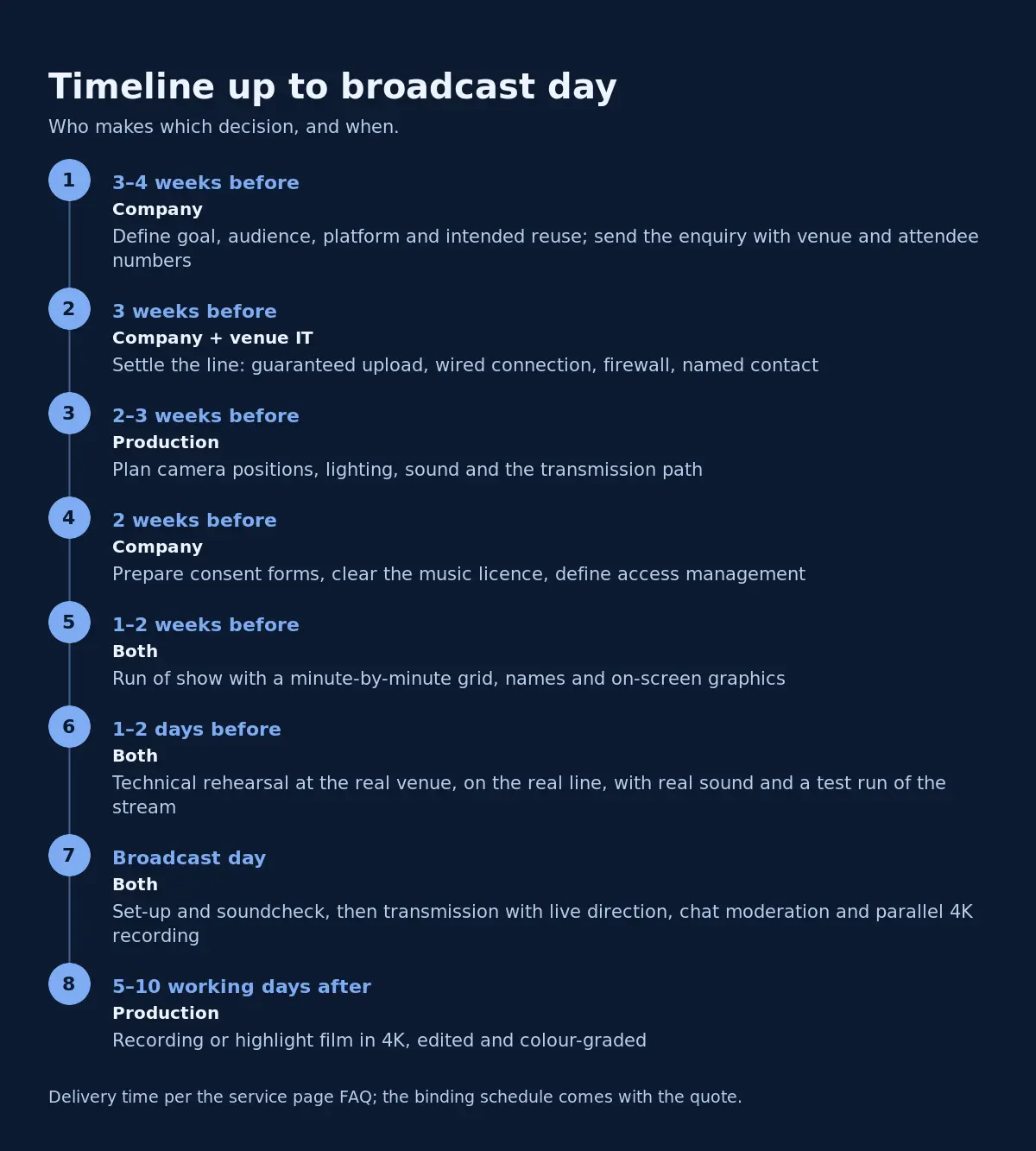
The 5–10 working day delivery window is stated in the FAQ on the service page; the binding schedule comes with the quote, according to the same page.
The most important row in that table is the technical rehearsal. Not the meeting about the technology, but the test run at the real venue on the real line. Everything that surfaces there costs minutes. Everything that only surfaces on the day costs the broadcast.
Picture: Cameras, Vision Mixing and What the Remote Audience Needs
The number of cameras depends on package and production, according to the service page; 4K and 6K cameras, several perspectives plus a 4K drone and GoPro are named as options. Live vision mixing cuts between the images during the broadcast.
What matters more to you as the organiser than the camera count is what has to be in frame:
- The presentation has to be readable. Anyone watching on a laptop at home cannot read a slide shown as a small rectangle behind the speaker. Plan a full-screen slide feed or a split image.
- One steady shot as a resting point. Constant cutting is tiring; a clean medium shot of the speaker is the base image.
- Audience shots are delicate. Every pan into the audience is a consent question (see below).
- Captions. For accessibility and for everyone watching without sound. Check whether the platform provides automatic captions and whether their quality is good enough for your purpose.
If speeches are to come from a teleprompter, that is included per the package list; the technology has its own page under teleprompter / PowerPoint.
Sound Is Where Streams Really Fail
An audience forgives a noisy picture. It does not forgive bad sound — after two minutes the window has closed. Included according to the service page are a lavalier microphone, a boom and an audio recorder.
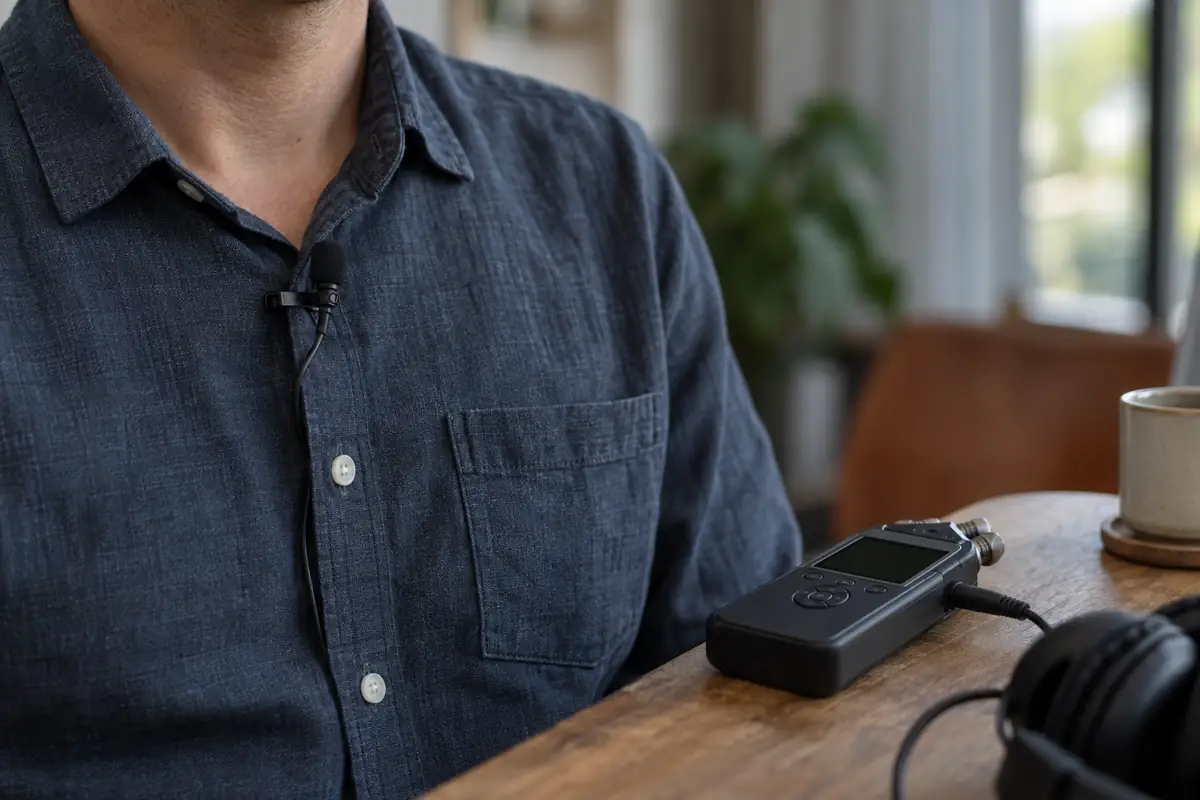
Three things you have to contribute as the organiser:
- Do not confuse room sound with stream sound. What sounds good in the hall over the PA is often unusable for the stream. The stream needs its own feed from the desk, not a microphone in the room.
- Audience questions need a microphone. A question asked without one does not exist in the stream. Either pass a floor microphone around or have the host repeat every question.
- Spare microphone and spare batteries. Lavaliers fail; on broadcast day there is no second attempt.
Presentations, Teleprompter and Remote Guests
Remote speakers and guests are the most common cause of delays on the day. Three rules:
- Every remote guest is tested in advance — same device, same line, same headphones as on the day. A test “sometime last week” does not count.
- Headphones are mandatory for everyone dialling in. Without them you get feedback, and the whole audience hears it.
- Presentations sit with the production team, not on the guest’s laptop. Files handed over a week ahead, fonts embedded, videos supplied separately.
One practical note on the slides: build presentations for the stream in 16:9 with large type and little text per slide. What works on a hall projector is often unreadable in a stream window on a phone. Which format suits which channel is covered in Video Formats for Business.
Interaction: Moderate the Q&A
The advantage of a stream over a film is participation. It does not happen by itself:
- One person moderates the chat and nothing else, collecting questions — not the person also operating the technology.
- Questions get bundled and read out, not worked through one by one.
- Prepare an opening question. The first question rarely comes from the audience; without one prepared you get silence.
- Decide in advance whether the chat is publicly visible. For internal events the answer is usually no.
Music in the Stream: Do Not Forget the Licence
If music plays in your broadcast — an intro, a break loop, background in a video insert — that is a use requiring a licence. In Germany, GEMA treats livestreaming as its own case and describes it as content “made available to all viewers only at one particular time simultaneously, similar to a television broadcast”; according to GEMA the licence also covers a single later linear replay of the stream on the website (GEMA: music use on the internet, in German, retrieved 27 October 2026).
In practice: settle the licence before the event, not after, and decide early whether to use royalty-free or purpose-made music instead. An audio logo or a bespoke sting can be produced — 3DMS points to its own recording studio for that.
People on Camera: Consent Is Mandatory
As soon as identifiable people appear in the stream — speakers, employees, audience — § 22 of the German Kunsturhebergesetz applies: portraits may as a rule only be distributed or publicly displayed with the consent of the person depicted (statute, in German).
For practice that means:
- Speakers sign a release covering the stream and the reuse. “We are streaming this” is not consent to later publication on LinkedIn.
- Audience: a notice at the entrance and in the programme, plus a camera-free zone in the hall for anyone who does not want to be on screen. That is the simplest way to settle the question on the day.
- Employees should not be covered wholesale through the employment contract. A separate, voluntary consent is the safe route; when in doubt, ask your own data protection officer.
If your legal team or data protection officer has a say, bring them in before the platform decision. A public stream cannot be turned into an internal one after the fact.
Backup: What Happens If the Line Drops
Every stream needs a plan B, and it has to be agreed before the day:
- The parallel 4K recording is the most important fallback. It runs anyway according to the service page — if the stream fails, you still have the event.
- A second connection, ideally over a different route than the house line.
- A holding card with text (“We will be back shortly”) that the gallery can cut to.
- A channel to the audience outside the stream: an email address, a chat channel, a status page.
- One decision made in advance: who calls it off or postpones in case of doubt? That person has to be reachable and authorised on the day.
What a Live Broadcast Costs
| Package | Production time | Price |
|---|---|---|
| Basic | 4 hours | €899 net |
| Pro | 8 hours | €1,699 net |
| Ultra | 2 × 8 hours | €3,299 net |
All package prices are net plus 19 % VAT. Every additional hour costs €249 net. The green screen studio is available as an option — €450 with Basic, €800 with Pro and €1,600 with Ultra.
Included in all three packages according to the service page: film team and equipment, lavalier microphone, boom and recorder, the live broadcast, lighting, hybrid conferencing, teleprompter, plus 4K editing and effects.
For orientation: the four hours in the Basic package are production time, not airtime. Setup, soundcheck and rehearsal come out of it. A two-hour event with proper lead time fits; a conference day from 9 to 17 does not.
Current terms are on the livestream service page and in the price list.
Common Mistakes – and How to Avoid Them
- Relying on guest Wi-Fi. Wired connection with guaranteed upload bandwidth, confirmed in writing.
- Not counting the viewers in your own building. 200 internal viewers are 200 downstreams on the same line.
- Deciding the platform last. It determines access, format and reuse.
- No technical rehearsal at the real venue. A meeting is not a rehearsal.
- Not testing remote guests. Same device, same line, same headphones.
- Taking stream sound from the room. Use a dedicated feed from the desk.
- Using music without a licence. Settle it beforehand, not retroactively.
- Verbal consent only. In writing, and covering stream and reuse.
- No plan B. Second connection, holding card, named decision-maker.
- Not planning the recording. The stream is ephemeral; the recording is what remains.
FAQ – Frequently Asked Questions About Live Broadcasting
What does a live broadcast in Munich cost? According to the service page the packages start at €899 net (Basic), €1,699 net (Pro) and €3,299 net (Ultra), each plus 19 % VAT. Additional time costs €249 net per hour, and the green screen studio is optional at €450, €800 or €1,600.
Which platforms do you produce for? YouTube, Vimeo, Zoom, Microsoft Teams, Facebook, LinkedIn and Twitch are named, plus bespoke streaming solutions and hybrid conferences.
What quality is the broadcast? The live broadcast is in 1080p at 50 frames per second per the package description; a 4K recording runs in parallel.
How much bandwidth do we need on site? That depends on resolution and frame rate. YouTube gives a minimum of 6 Mbps for 1080p at 60 frames per second with H.264 and recommends 17 Mbps. Plan headroom above that and provide a wired connection with guaranteed upload bandwidth.
When do we receive the recording? The stream itself is real time. A recording or highlight film is usually delivered within 5–10 working days after the event according to the service page FAQ; the binding schedule comes with the quote.
How many cameras are used? The number depends on package and production. 4K and 6K cameras are used, with several perspectives plus a 4K drone and GoPro.
Can guests join from elsewhere? Yes, hybrid conferencing and Zoom integration are part of the packages. Test every remote guest in advance on their actual device.
Do we need consent from attendees? For identifiable people on camera, § 22 KunstUrhG applies — consent is required as a rule. Get it in writing and have it cover both the stream and the reuse.
May we use music in the stream? Only with a licence. GEMA treats livestreaming as its own form of use. Settle it before the event or use purpose-made music.
Do you work only in Munich? The focus is Munich and the surrounding area according to the service page; assignments across Germany and internationally are possible.
Can we use the green screen studio for our own production? The service page names the studio with green screen, recording studio and lighting as available to rent; terms and availability on request. Technical details are under blue/green screen.
What if the event runs longer than booked? Every additional hour costs €249 net. Plan the lead time realistically — package time is production time, not airtime.
Your Live Broadcast in Munich
Once date, venue and platform are settled, send your enquiry through the contact form. State: venue, date and time, expected online audience, number of viewers inside your own building, preferred platform, remote guests, presentations and whether you need a recording. Those are exactly the points 3DMS settles in advance according to the service page — sending them along saves a round of coordination.
All packages and inclusions are detailed on the livestream page, the equipment under technical data, and the site in Westendstraße 177 under location.
Request a livestream
Live broadcasts are planned individually – there is no instant booking for them. Send the key details through the contact form and you will get a concrete quote back.
Location & Getting There
3DMS produces in Munich and the surrounding area; assignments across Germany and internationally are possible. Office and studio are at Westendstraße 177 in Munich’s Westend district, a few minutes’ walk from the Westendstraße underground station.
Address
3DMS Filmproduktion München
Westendstraße 177, 4th floor
80686 Munich, Germany
Getting there
Underground: U4 or U5 to Westendstraße
Tram: line 18 to Westendstraße
Bus: 130 or 157 to Westendstraße, 62 to Elsenheimerstraße
Timetables and disruptions: MVG Munich
There are no dedicated customer parking spaces – if you drive, look for public parking nearby. Please arrange deliveries of equipment or material in advance.
Plan your route · Location page
Sources
- 3DMS: Livestream (service page, retrieved 27 October 2026)
- 3DMS: Event film (service page, retrieved 27 October 2026)
- YouTube Help: Live encoder settings, bitrates and resolutions (retrieved 27 October 2026)
- Microsoft Learn: Prepare your network for Teams (retrieved 27 October 2026)
- GEMA: Music use on the internet (retrieved 27 October 2026)
- Section 22 KunstUrhG (German Act on Copyright in Works of Fine Art and Photography)
Last Updated on 28/10/2026 by 3DMS
